
Write down theft, employee issues, and accidents in 2 minutes.
CRIMR helps small businesses document incidents while details are still fresh. Store notes, photos, and evidence in one place and get a clean report later for police, insurance, or your own records.
Use CRIMR when:
CRIMR is built for the moments where something happens, details matter, and you know you may need a clear record later.
Theft happens
Document what was taken, what happened, and any supporting evidence while details are still fresh.
A customer incident needs follow-up
Keep one clear record of the incident, including notes, photos, and what your team observed.
An employee issue needs documentation
Record the details consistently so you are not relying on memory or informal messages later.
You need proof of what happened
Have a report ready for internal review, insurance, or law enforcement when questions come up later.
Set up in minutes. No training required. Start with one location and grow from there.
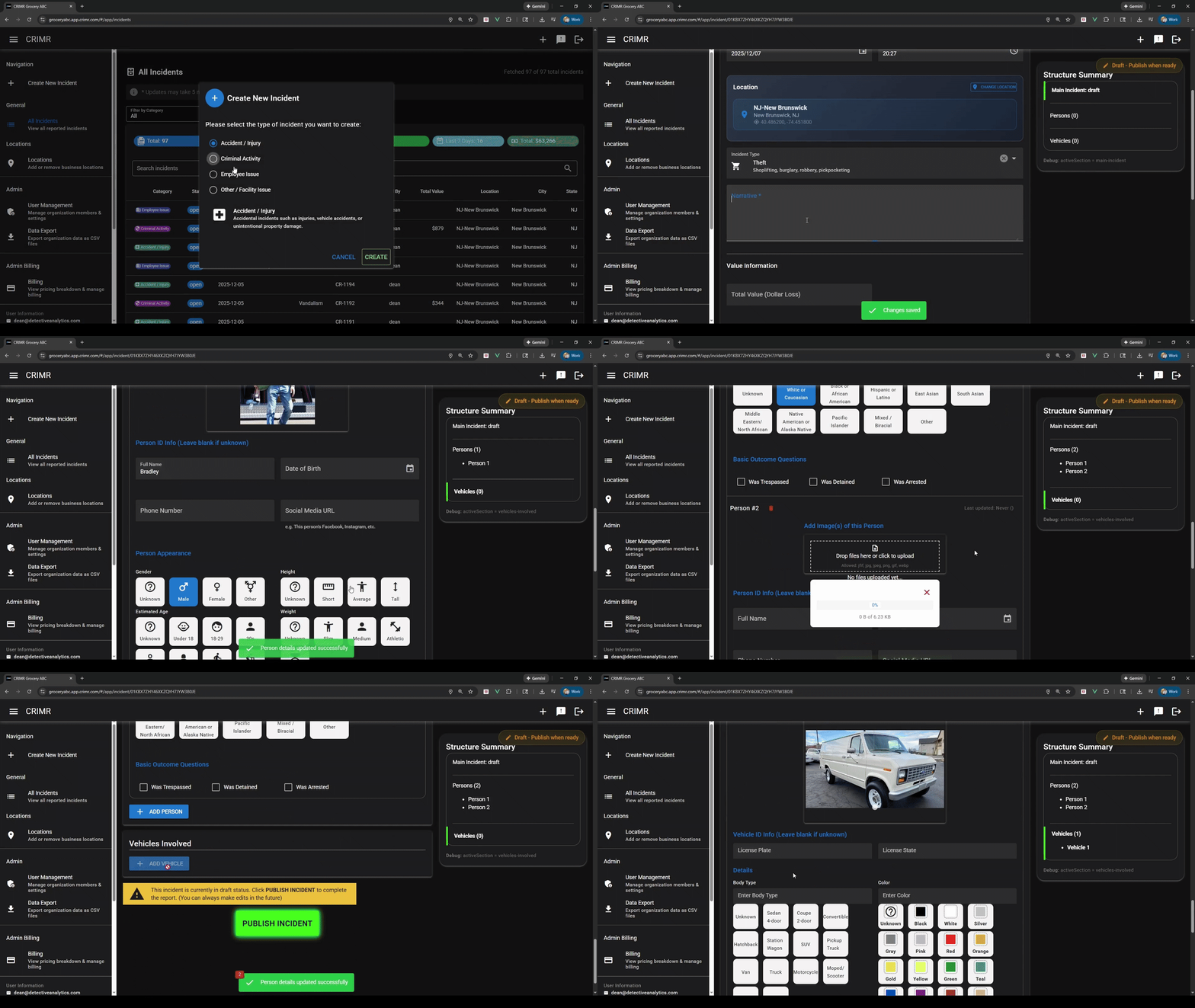
What gets easier once you use it
Instead of piecing things together later, each incident is already documented, organized, and ready when you need it.
Less trying to remember later
Capture what happened while details are still fresh, instead of trying to reconstruct it later.
Less chasing down details
Keep notes, photos, and evidence tied to the same incident so nothing gets separated.
Less scrambling when follow-up happens
Have a clean report ready for police, insurance, internal review, or your own records.
The 3-step reporting process
Most businesses don’t have a consistent way to document incidents. CRIMR gives your team a simple process that works the same way every time.
1. Write it down right away
Start a report as soon as something happens so details don’t get missed or forgotten.
2. Add details as you go
Attach notes, photos, and supporting information so everything stays in one place.
3. Keep the report ready
When you need it later, the full record is already organized and easy to use.
See exactly how it works
See how a real incident goes from “something happened” to a complete report that is ready to use.
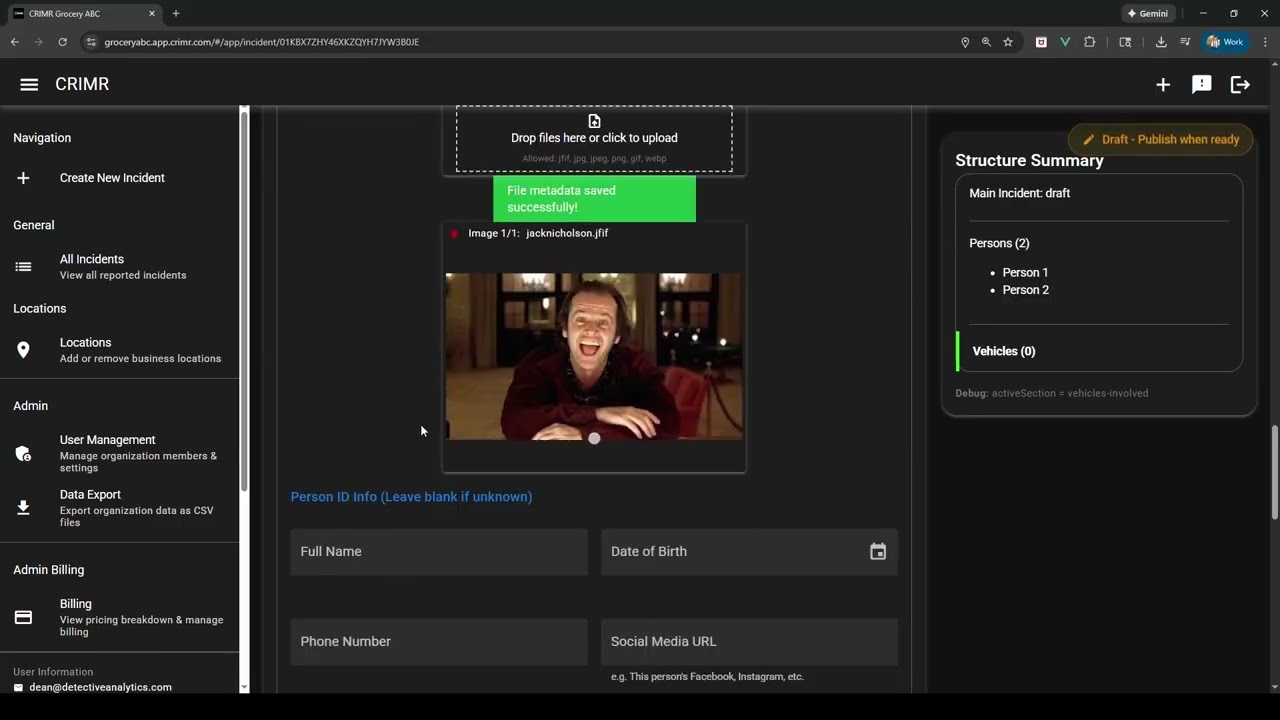 See how it works in about 60 seconds
Why business owners stick with it
The value is straightforward: when something happens, the record is already there when you need it later.
"It helps us document what happened before anyone forgets the details."
When something happens, speed matters. CRIMR gives us one clean place to capture the incident, save what we need, and keep everything together while it's still fresh.
"Having one clean record makes follow-up much easier."
We like that the process stays simple. When we need a report for insurance or police, it's clean, organized, and ready to go—and it can grow with us as we add more locations.
Trusted by real businesses


Start free today
Start documenting incidents the right way.
It takes minutes to start, and gives you a clear record when questions come up later.
Frequently asked questions
Everything you need to know before getting started.
What is incident reporting software?
Incident reporting software helps you document and store records of events like theft, accidents, customer issues, and employee issues in one place.
Why should I document incidents?
Clear records help protect your business if questions, disputes, insurance claims, or police follow-up happen later.
How long does it take to create a report?
Most reports in CRIMR take about 2 minutes.
Do I need training?
No. If you can fill out a simple form, you can use CRIMR.
Can I use it on my phone?
Yes. CRIMR works on mobile and desktop.
Report what happened once. CRIMR helps connect the dots.
When you document a theft in CRIMR, your report does more than stay in your own records. It can help connect similar incidents, organize evidence, and make it easier to share useful information with law enforcement or trusted partners.
Connect similar incidents
CRIMR can help identify reports that may be related by suspect, vehicle, behavior, or method so repeat activity is easier to spot.
Share clean reports with police
Keep your report, photos, and supporting details together so it is easier to share a clear case file with law enforcement when needed.
Share useful information with trusted partners
When appropriate, CRIMR can help the right businesses, groups, or teams see patterns that matter to them without relying on scattered texts or emails.
Small businesses can start free. Document theft incidents, keep records organized, and share reports when needed. Upgrade only if you want more users, more volume, or more incident types.
Get started freeWrite it down once. Have the full record when you need it.
When something happens in your business, CRIMR gives your team a consistent way to document it, keep the details together, and have a report ready later for internal use, insurance, or law enforcement.
Start a report as soon as something happens so details don’t get lost.
Start the report right away
Capture what happened while the details are still fresh instead of trying to remember later.
Keep the full incident together
Store photos, notes, and details in one place so nothing gets separated or lost.
Have a report ready when you need it
Generate a clean, structured report for your records, insurance, or law enforcement.
Start free. Upgrade only when your reporting needs grow.
Start with the core reporting workflow at no cost. Upgrade when you need more incident types, more users, or more activity across your business.
Fastest way to start
Document your first incident today — at $0.
Get the core CRIMR workflow, export clean PDF reports, and upgrade only when your business needs more. Start in minutes and move up only when your reporting volume, team, or locations grow.
- 1 location, 1 user
- Up to 4 incidents per month
- Document theft incidents
- 10 GB file storage
- Limited access to the shared incident network
- Core incident reporting and PDF export
- Everything in Free, plus:
- Document all incident types, including employee issues, accidents, and custom reports
- 3 users included ($20 / additional user)
- 10 incidents per month ($5 / additional)
- Unlimited locations (up to 1,000)
- 50 GB storage ($0.50 / additional GB)
- Incident sharing and standard support
- Everything in Premium, plus:
- Advanced investigation tools for larger organizations
- Bulk imports and external investigation workflows
- SSO, itemized loss tracking, live dashboards, and custom reporting
Built to feel easy from day one
Every tier, including Free, gives you the core CRIMR workflow: document the incident, attach evidence, and export a clean report when follow-up matters.
Why teams pick CRIMR
- 1 Shared incident visibility: reports can help connect similar incidents across businesses. Patent-protected (US 11,651,461).
- 2 Clear reports for law enforcement: share clean evidence and incident reports more easily when follow-up is needed.
- 3 Start free: document theft incidents today and upgrade only if you want broader reporting and more capacity.